Can a web-enabled AI assistant explain what you sell, who it suits, what it costs, and how to take the next step from your public website? Start with that question before adding another “AI-ready” project to the backlog.
The test is useful even if every one of your customers still buys through a person. People also appreciate knowing what “seamless integration” actually integrates.
What changed
In a September 29 update, Stripe reported that agentic purchases made with Link had increased 38× over the preceding month. That is a specific payment channel and time period. Stripe did not give a starting purchase count or an overall market share.
The finding concerns consumer spending. It does not establish that AI agents are closing B2B deals or replacing your sales team.
For a marketing team, the useful implication is narrower: if a buyer sends an assistant to compare vendors, your website needs to supply facts it can check. A beautiful page that says very little gives it very little to work with.
Can an assistant explain your offer without guessing
Start a fresh conversation with a web-enabled AI. Record the tool or model, date, prompt and URLs tested. Five minutes can start a spot-check; checking every answer and the conversion path takes longer. Use your public URL and this prompt:
Using only this company’s public website, explain who it serves, the problem it solves, pricing or pricing factors, supported integrations, and how to get started. Cite the exact page for each answer. Flag contradictions and uncertainty. Distinguish pages you could not access from facts you could not find. Do not fill gaps with assumptions.
Read the cited pages yourself. An AI answer can be wrong even when it sounds like it has attended all your sales meetings.
Separate missing or unclear content from retrieval failures and model errors. Open the page yourself, then retry the disputed question with its exact URL. If needed, compare another web-enabled tool. Record the result before drawing conclusions. One run cannot establish a site-wide defect or an “AI visibility score.”
Which facts belong on a HubSpot website
Start with one important product or service page. Give it enough detail to survive a comparison with two competitors.
- Fit: name the team, problem, and relevant constraints. “For growing businesses” leaves a lot of businesses to sort through.
- Price: publish the amount where appropriate. If work is custom-priced, explain the scope factors, minimum engagement if applicable, and what the quote includes.
- Integrations: specify the systems, supported objects, sync direction, and material limits. “Works with HubSpot” could mean a native connector, a custom build, or someone with a CSV.
- Proof: show a relevant, approved example with enough context to judge it. A customer logo cannot explain what you actually delivered.
- Next step: say what happens after the form, who responds, and any timing you can genuinely support.
Check related pages for contradictions. Your pricing page, FAQ, and old landing page should agree about the same offer. An assistant should not need a committee to reconcile them.
We tested our own HubBase page
Method: On October 13, 2026, we reviewed our public Website Growth Retainer page with ChatGPT’s web retrieval and checked the live page in a browser. We compared the offer, monthly examples and expanded FAQ. This is a content spot-check, not a conversion test.
The question: What can a buyer verify about fit, price, included work, extra hours and the next step, using this page alone?
At the first review, fit, $1,000 monthly pricing, 10 hours, month-to-month terms and the intro-call CTA were clear. Extra hours were available, but we did not find their rate or a rollover policy on that version of the page.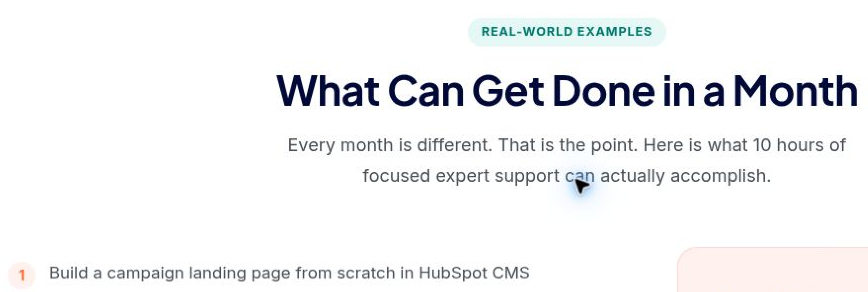
Before • October 13, 18:49–18:50 UTC: the monthly examples included a campaign landing-page build from scratch. 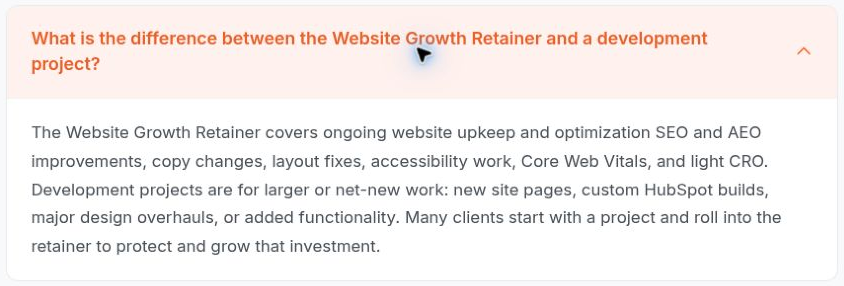
Before • October 13, 18:49–18:50 UTC: the expanded FAQ put new site pages under larger or net-new development projects.
The unclear boundary was between those scopes: a landing page can also be a new site page. A buyer had to ask which builds used retainer hours and which required a separate quote. We treated that as ambiguity to resolve, not proof that every new page was included or excluded.
What changed on the live page
After confirming the policy, our team updated the page. We checked the published wording in a fresh browser at 21:22–21:23 UTC on October 13 and re-read it through web retrieval. The screenshots below show the live correction.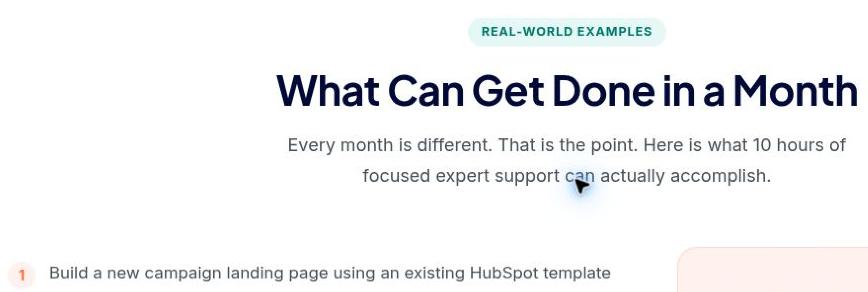
After: the monthly example now specifies an existing HubSpot template. 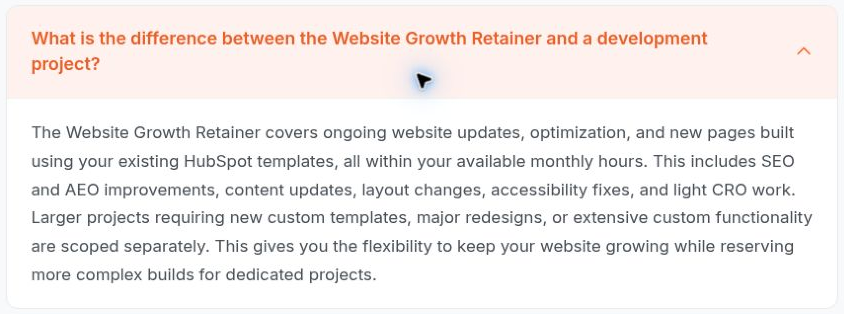
After: the FAQ distinguishes existing-template pages from separately scoped custom templates.
The clarified scope: new pages using existing templates fit within available monthly hours. New custom templates, major redesigns and extensive custom functionality are separately scoped.
The page also now explains carryover: unused hours last up to three months while the retainer stays active. Larger in-scope work using banked hours needs advance notice and an agreed schedule based on team capacity.
We verified those content changes, not a conversion lift or an AI-accuracy gain. The extra-hour rate still was not stated on the reviewed page. The useful result: a buyer can read the scope boundary and carryover rule instead of asking us to explain them.
Does your HubSpot conversion path actually work
Clear copy can help a buyer reach the next step. The next step still has to work.
Run a controlled test of your main enquiry path with your team: open the page, complete the required fields, check the confirmation, then verify the contact and expected follow-up in HubSpot. Use an agreed test record so nobody mistakes QA for pipeline.
If you are testing agent-assisted enquiries, record exactly where the assistant needs a human handoff. Do not assume an API route behaves like a browser form.
HubSpot documents a concrete difference: when CAPTCHA is enabled on a form, submissions from its Submit data for a form API or other form integrations are not accepted. Its CAPTCHA protection can also challenge suspicious browser visitors.
Keep fraud and spam controls in place while you investigate. Have the technical owner choose a supported route and a clear human fallback. “We removed security because a bot complained” is an awkward incident report.
Do you need special AI markup
For Google’s AI Overviews and AI Mode, ordinary SEO best practices apply. A supporting page must be indexed and eligible for a Search snippet; there are no additional technical requirements or special AI markup. Meeting the rules does not guarantee inclusion. This guidance concerns Google Search, not every independent browsing agent.
Begin with readable page text, useful headings, clear internal links, and an accessible experience. Check what your actual test assistant can retrieve. Put important offer details on the page rather than only in an image or behind a lead form.
Use relevant structured data accurately where it helps describe your content. Keep it consistent with the visible page. It cannot supply a pricing explanation you never wrote.
What about payments and trust
A research assistant finding your pricing is a different task from an agent spending money. If you sell online, make the total cost, recurring commitment, cancellation terms, and support route easy to find before checkout.
Stripe says Link lets agents request a higher approved amount when a final price exceeds the original. That is not a promise that every increase is automatically approved. Its update names Muse as the first agent offering Link purchase protections, subject to consumer and transaction eligibility. Check the applicable terms; protections are not universal.
Test the actual product and payment route before making promises about security, refunds, or who pays if something goes wrong. Your checkout copy should explain the transaction the customer is authorizing.
What should you fix first
Choose the page your sales team keeps explaining on calls. Run the prompt, inspect the evidence and retest disputed answers. Fix the most consequential confirmed gap, then repeat the same check.
For a HubSpot team, that might be a clearer service page, an integration FAQ, or a form that reaches the right person reliably. These are concrete website improvements you can prioritize and verify.
Give the assistant fewer reasons to guess. Give the human buyer fewer reasons to book a call just to find out what you do.



















.png?width=343&height=334&name=Frame%20(3).png)
.png?width=343&height=479&name=Frame%20(4).png)
 5 min read



.png?width=204&height=62&name=Frame%20(13).png)
.png?width=204&height=62&name=Frame%20(18).png)
.png?width=204&height=62&name=Frame%20(11).png)
.png?width=204&height=62&name=Frame%20(12).png)
.png?width=204&height=62&name=Frame%20(15).png)
.png?width=204&height=62&name=Frame%20(16).png)
.png?width=204&height=62&name=Frame%20(17).png)
.png?width=194&height=62&name=Frame%20(20).png)
