Connecting HubSpot to your internal systems is one of the most valuable investments you can make for your marketing and sales operations. But when you start researching integration options, the pricing can feel all over the map—anywhere from a few hundred dollars per month to six figures for a custom build. HubBase has built over 100 custom integrations, and we've learned that understanding what drives these costs is the first step to making a smart investment.
This guide walks you through every option for integrating HubSpot with your internal systems, including custom API development, private apps, webhooks, and iPaaS platforms. You'll learn what each approach actually costs, when to choose one over another, and how to avoid the hidden expenses that catch most teams off guard.
Key Takeaways: Custom HubSpot Integration Costs and Options in 2026
- Simple one-way HubSpot integrations typically cost between $1,500 and $6,000, while bidirectional syncs range from $6,000 to $40,000 depending on complexity.
- iPaaS tools can reduce upfront costs but often create ongoing subscription fees between $100 and $500 per month that add up over time.
- HubBase offers prebuilt integrations and custom API development that save you development time while avoiding long-term maintenance burdens.
- The biggest cost drivers are data volume, sync frequency, number of connected systems, and any compliance requirements like HIPAA or GDPR.
- Custom integrations make the most sense when you need bidirectional sync, complex business logic, or connections to proprietary internal systems.
What Does "Custom HubSpot Integration" Actually Mean?
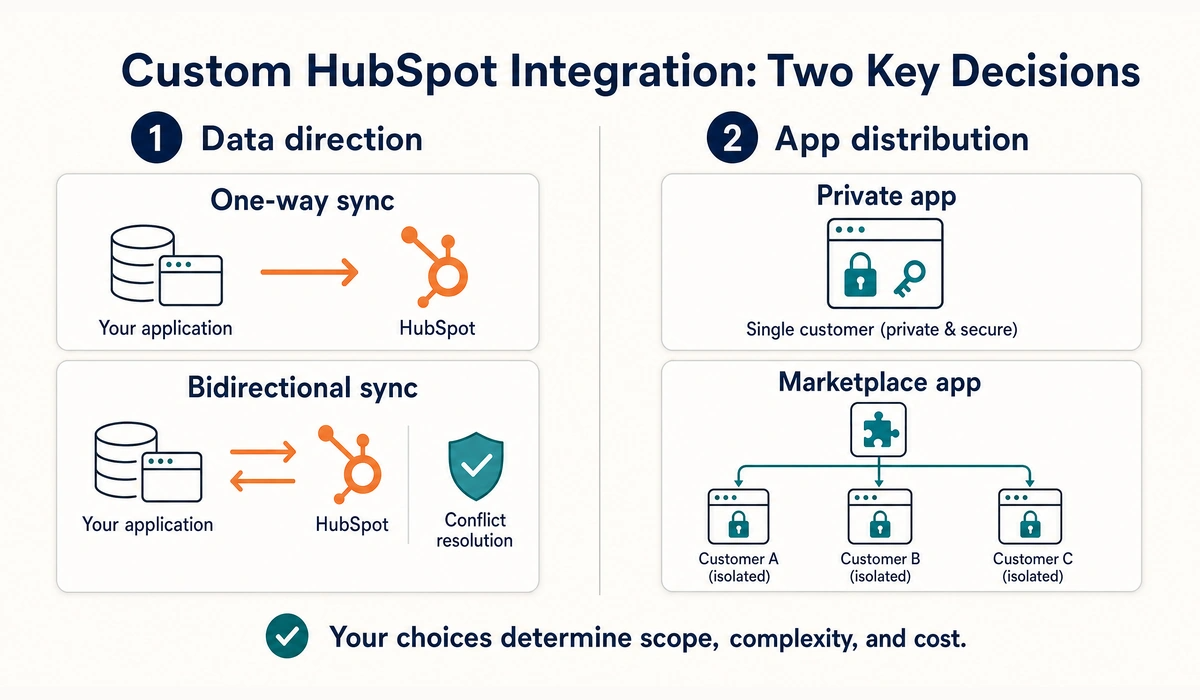
The term "custom HubSpot integration" covers four distinct approaches, and confusing them is the most common reason early cost estimates miss by a wide margin.
A one-way sync sends data from your system into HubSpot. Your app creates contacts, updates deals, or sets custom properties—but nothing flows back. This is the simplest and most affordable option.
A bidirectional sync moves data both directions. Changes in HubSpot update your app, and changes in your app update HubSpot. This requires conflict resolution logic to handle situations where both systems update the same record simultaneously.
Private Apps vs. Public Marketplace Apps
A private app is installed in one specific HubSpot portal using an access token. You can add UI extensions that display custom data inside HubSpot records, but the app only works for your account.
A public marketplace app is distributed to any HubSpot customer through the App Marketplace. This requires OAuth authentication, multi-tenant architecture, security review, and ongoing maintenance—making it significantly more expensive to build and maintain.
How Much Does a Custom HubSpot Integration Cost?
Integration costs depend primarily on the complexity of your requirements and whether you're building for internal use or distribution. Here's what to expect at each tier.
Tier 1: Simple One-Way Sync ($1,500–$6,000)
This covers integrations where your application sends data to HubSpot—creating contacts, updating properties, or logging activities. There's no reverse flow and no custom UI inside HubSpot.
A typical project at this level takes 8 to 25 engineering hours. You'll use HubSpot's CRM API and a private app access token for authentication. Most teams can launch within one to two weeks.
Tier 2: Bidirectional Sync ($6,000–$40,000)
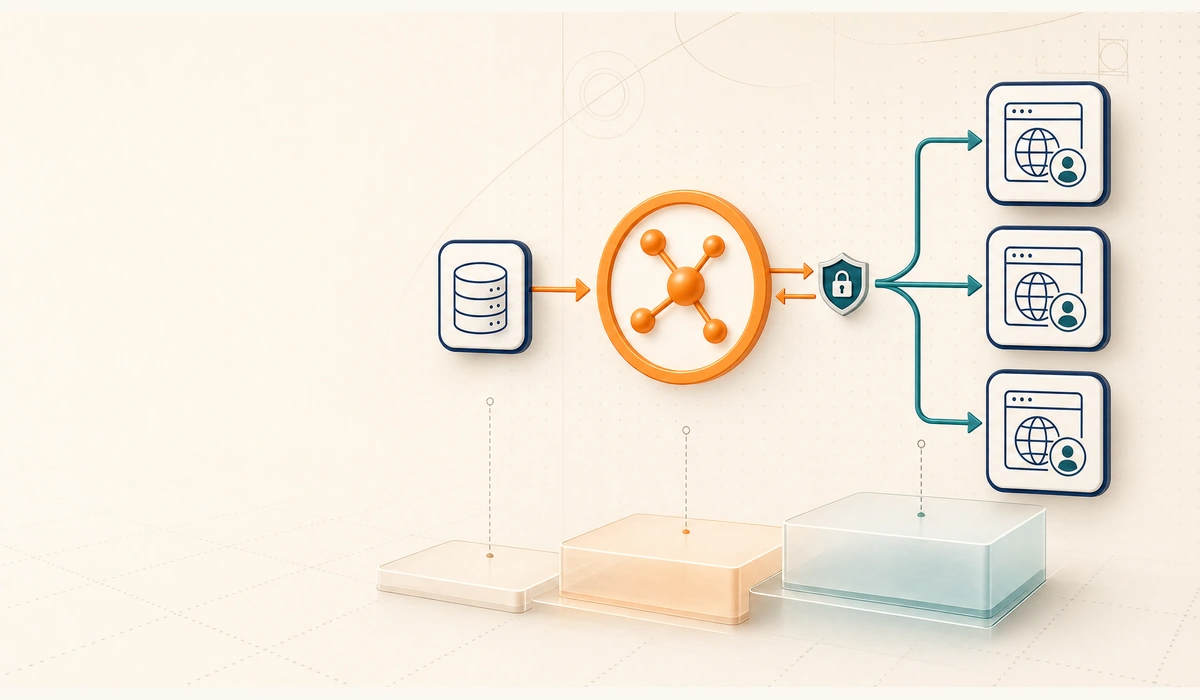
Bidirectional sync is where complexity—and cost—increases significantly. You need webhook receivers to capture changes from HubSpot, a queue system to process events reliably, and conflict resolution logic to handle simultaneous updates.
HubSpot's webhooks retry failed deliveries for 24 hours, but only if your endpoint returns a server error. A client error means the message disappears permanently. Reliable integrations use a write-to-queue pattern that acknowledges webhooks immediately, then processes them with exponential backoff.
Tier 3: Full Marketplace App ($50,000–$150,000+)
Building for the HubSpot Marketplace introduces OAuth flows, multi-tenancy, per-portal data isolation, and a review process that typically takes two to six weeks with revisions. UI Extensions add React-based components that render inside HubSpot records.
The hidden cost at this tier is multi-tenancy. Every customer brings their own portal, custom properties, and pipeline stages. Your data model must accommodate all these variations without breaking.
What Factors Drive HubSpot Integration Costs Up?
Understanding these cost drivers helps you scope your project accurately and avoid surprises later.
Integration Complexity
A one-way data push is relatively straightforward. A bidirectional sync with conditional logic and data transformations costs significantly more. The more business rules you need to encode, the higher the development time.
Number of Systems and Objects
Connecting HubSpot to one database is simpler than integrating three or four systems in a unified workflow. Each additional endpoint means more API calls to manage, more potential failure points, and more field mapping work.
Even within a two-system integration, the number of objects matters. Syncing contacts alone is cheaper than syncing contacts, companies, deals, and custom objects together.
Data Volume and Sync Frequency
Syncing a few hundred records nightly requires less infrastructure than syncing millions of records in near-real-time. High volume often requires queuing systems, batch processing, and performance optimization—all of which add development time.
Security and Compliance Requirements
If your integration handles sensitive data under HIPAA, GDPR, or SOC 2 requirements, expect additional development time. This includes encrypting data in transit and at rest, implementing audit logs, and potentially signing Business Associate Agreements with vendors.
When Should You Use Native Integrations Instead of Custom Builds?
Before committing to custom development, check whether an existing integration already meets your needs. HubSpot's marketplace includes over 1,400 pre-built connectors.
Use Native Integrations When:
Your use case is standard—syncing contacts, companies, and deals between popular platforms. Native connectors are designed for these common scenarios and require no coding.
Budget is limited and speed matters. If you need the integration live quickly with minimal investment, pre-built options win on both fronts.
You don't have extreme requirements around data volume, latency, or security. Standard tools handle typical business needs well.
Use Custom Integrations When:
Your business logic is too complex for pre-built tools. Custom integrations can handle sophisticated routing rules, data transformations, and conditional workflows that native connectors can't.
You need to connect proprietary or legacy systems. If no off-the-shelf connector exists for your internal database or ERP, custom development is often your only option. HubBase specializes in these types of custom builds, connecting HubSpot to systems that other platforms can't reach.
What Are iPaaS Platforms and How Do They Compare?
Integration Platform as a Service (iPaaS) tools offer a middle ground between native connectors and fully custom builds. They let you connect HubSpot to other apps through visual workflow builders.
iPaaS Cost Structure
Most iPaaS platforms charge monthly subscriptions based on the number of tasks or operations you run. Entry-level plans start around $100 per month, while enterprise tiers can reach $500 or more monthly.
The advantage is lower upfront cost and faster deployment. The tradeoff is ongoing subscription fees that accumulate over time, plus limitations on what these tools can handle.
When iPaaS Works Well
iPaaS tools excel at connecting HubSpot to popular SaaS applications with straightforward data flows. If you need to push form submissions to a Google Sheet or sync contacts with an email marketing platform, these tools get the job done quickly.
When iPaaS Falls Short
Complex business logic, high-volume syncs, and connections to proprietary systems often exceed what iPaaS platforms can handle. You may find yourself building workarounds that become harder to maintain than a proper custom integration would have been.
How Do Private Apps and Webhooks Work in HubSpot?
Understanding HubSpot's technical building blocks helps you make informed decisions about your integration approach.
Private Apps
Private apps use access tokens for authentication and can only be installed in the HubSpot account where they're created. They support serverless functions for backend logic and UI extensions for displaying custom data inside CRM records.
Building UI extensions requires a HubSpot Enterprise subscription for production use, though you can experiment in developer test accounts for free.
Webhooks
Webhooks let HubSpot notify your application when specific events occur—contact creation, property changes, deal updates, and more. Instead of constantly polling the API for changes, your system receives push notifications in near-real-time.
According to HubSpot's official documentation, webhooks require a publicly accessible HTTPS endpoint that can respond within five seconds. If your endpoint is slow or returns errors, HubSpot retries delivery for up to 24 hours.
What Are the Typical Timeline Expectations for Integration Projects?
Setting realistic timeline expectations prevents frustration and helps you plan resource allocation properly.
Native or Middleware Integrations: 1–4 Weeks
Pre-built integrations using HubSpot's native connectors or iPaaS tools typically launch within days to a few weeks. Most of the time goes to configuration, testing, and internal approvals rather than technical work.
Custom Integrations: 8–12 Weeks
Custom builds generally take two to three months from kickoff to production. This includes discovery and planning, development, sandbox testing, user acceptance testing, and deployment.
Complex integrations involving multiple systems, extensive business logic, or large data volumes can extend to four to six months.
Factors That Extend Timelines
Legacy APIs using older protocols like SOAP require more development time than modern REST APIs. Unclear requirements that evolve mid-project cause delays. Security and compliance reviews add weeks for audits and approvals.
How Can You Reduce Integration Costs Without Cutting Corners?
Smart planning can significantly reduce your integration investment without sacrificing quality.
Start With What HubSpot Already Offers
Check whether a native integration covers your core requirements before scoping custom work. Even if you eventually need custom development, native connectors might handle 80% of your needs at minimal cost.
Begin With One-Way Sync
Many teams that request bidirectional sync actually need writes in one direction plus a few specific fields flowing back. Starting with one-way sync lets you validate the approach before investing in full bidirectional complexity.
Build the Reconciliation Job Early
Every integration team that skips building a nightly reconciliation job ends up rebuilding it later under pressure. This job compares both systems and patches any drift caused by missed webhooks or race conditions. Building it upfront saves significant manual data cleanup time.
Work With Experienced HubSpot Integration Partners
HubBase brings 14 years of HubSpot expertise and has completed over 100 custom integrations. Working with specialists who've solved similar problems before reduces development time and helps you avoid common pitfalls that inflate costs.
How Should You Choose Between Build vs. Buy for HubSpot Integrations?
The build-vs-buy decision depends on your specific requirements, budget constraints, and long-term maintenance capacity.
Questions to Ask Before Deciding
Can an existing connector meet at least 80% of your requirements? If yes, the remaining 20% might not justify custom development costs.
Do you have proprietary systems with no existing integrations? If your internal database or legacy ERP has no off-the-shelf connector, custom development becomes necessary.
What's your tolerance for ongoing subscription costs? iPaaS subscriptions accumulate over years. A custom integration's one-time cost might be lower over a five-year horizon.
The Hybrid Approach
Many organizations use a layered strategy: native connectors for standard objects, middleware for quick wins on specific workflows, and custom development only for requirements that can't be met any other way. This minimizes custom work while still addressing unique needs.
What Common Integration Scenarios Do Mid-Market Companies Face?
Here are typical integration scenarios with general cost guidance based on industry patterns.
CRM-to-CRM Sync
Syncing HubSpot with another CRM like Salesforce ranges from a few thousand dollars for basic contact sync using native connectors to significantly more for complex integrations involving custom objects and advanced lead assignment rules.
ERP Integrations
Connecting HubSpot to ERP systems like NetSuite or Microsoft Dynamics tends to be more complex due to the nature of ERP data—orders, invoices, products. Factors affecting cost include the number of modules integrated and the age or complexity of the ERP's API.
Marketing and Analytics Integrations
Marketing and analytics integrations typically cost less because HubSpot has strong native capabilities in this area. Connecting to data warehouses, advertising platforms, or other marketing tools often falls on the simpler end of the spectrum.
What Should You Look for in a HubSpot Integration Partner?
Not all integration providers have equal expertise. Evaluating partners carefully protects your investment.
Experience With Similar Integrations
Ask for case studies involving systems similar to yours. A partner who has integrated HubSpot with your specific ERP or database type will work more efficiently and anticipate pitfalls that less experienced teams would miss.
HubSpot Certifications and Recognition
HubSpot certifications indicate validated expertise. Look for partners with CMS certifications and integration-specific credentials that demonstrate deep platform knowledge.
Post-Integration Support
Integrations often require adjustments after real-world use surfaces edge cases. A partner that offers ongoing support keeps your integration reliable over time. HubBase gives you ongoing support and maintenance for the integrations we build.
FAQs About Custom HubSpot Integration Costs and Options
How long does a custom HubSpot integration take to build?
Simple one-way syncs typically ship in one to two weeks. Bidirectional syncs with conflict resolution take two to six weeks. Full marketplace apps with UI extensions and OAuth require four to nine months, including the review process.
Do I need a HubSpot Enterprise account for custom integrations?
Basic API access works on HubSpot's free tier. However, custom objects, advanced webhooks, and UI extensions for production use require Professional or Enterprise subscriptions. HubBase can help you determine which tier fits your integration requirements.
What's the difference between private apps and public apps on HubSpot?
Private apps install in one specific HubSpot portal using an access token. Public apps distribute through the HubSpot Marketplace and require OAuth, multi-tenancy, and security review. Private apps cost significantly less because they skip these requirements.
Can I build a HubSpot integration with no-code tools?
Yes for simple one-way syncs and some bidirectional scenarios. iPaaS platforms handle many standard integration patterns well. UI extensions and marketplace apps still require custom development. HubBase offers prebuilt integrations that bridge the gap between no-code limitations and full custom builds.
What ongoing maintenance does a HubSpot integration need?
Plan for a few engineering hours per month for simple syncs to handle API changes and field additions. Bidirectional syncs need more attention for reconciliation tuning and edge cases. Marketplace apps require dedicated support for customer-specific issues.
When should I choose custom development over iPaaS?
Custom development makes sense when you have complex business logic, proprietary systems without existing connectors, high data volumes, or strict compliance requirements. If an iPaaS tool can meet your needs, it's often the faster and more cost-effective starting point.



















.png?width=343&height=334&name=Frame%20(3).png)
.png?width=343&height=479&name=Frame%20(4).png)

 2 min read


.png?width=204&height=62&name=Frame%20(13).png)
.png?width=204&height=62&name=Frame%20(18).png)
.png?width=204&height=62&name=Frame%20(11).png)
.png?width=204&height=62&name=Frame%20(12).png)
.png?width=204&height=62&name=Frame%20(15).png)
.png?width=204&height=62&name=Frame%20(16).png)
.png?width=204&height=62&name=Frame%20(17).png)
.png?width=194&height=62&name=Frame%20(20).png)
