Chances are, no one on your marketing team reads the HubSpot developer changelog. We do, and on August 11 it posted this: from September 8, HubSpot starts enforcing your portal's own required-field rules on data arriving from outside apps. Integrations that skip a required field can start getting rejected.
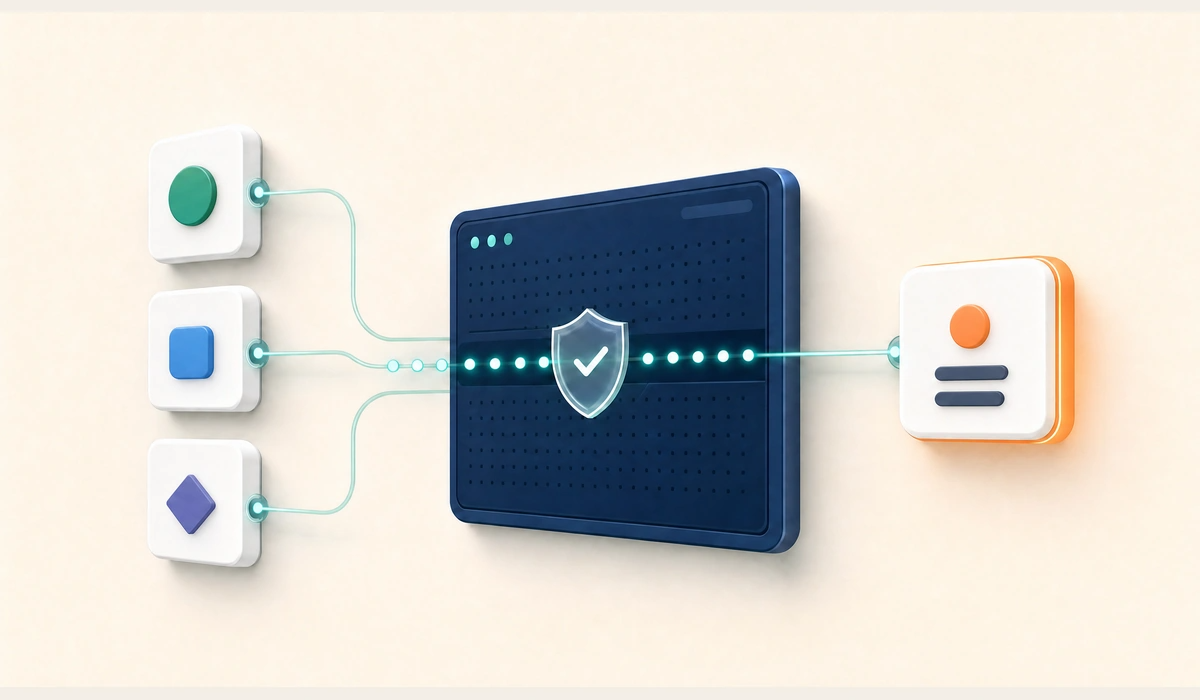
Here is the way to picture it, and it is the only image you need for the rest of this article.
Your HubSpot has a front door and a back door.
The front door is where people type. A rep creates a deal, fills in the form, and if your team marked "close date" as required, the form will not let them past it. That check has always been there.
The back door is where software writes in. A Zap. A sync from your billing system. A vendor app. Until now, anything coming through the back door could put a record straight onto the shelf without anyone checking whether the required fields were filled.
On September 8, HubSpot starts checking the back door too.
That is the whole change. Everything below is detail.
We build these integrations every week, over 100 of them to date, so the honest read from us is not "the sky is falling." It is "go look at two settings, and you will know whether this touches you at all." And if nobody at your company ever set up those rules, your back door has nothing to check. Nothing changes for you.
Every technical claim below comes from HubSpot's own changelog and knowledge base, linked as we go.
What exactly changes on September 8?
One piece of vocabulary, because you will need it when you talk to whoever maintains your integrations. HubSpot stamps its API versions with a year and month, the way a car has a model year. The version arriving September 8 is called 2026-09, and it is the first one that checks the back door. Anything still calling an older version keeps behaving as it does today.
Three kinds of rule get enforced.
Rules that only apply sometimes. Your team can set a rule like "close date is required, but only once a deal reaches Closed Won." Think of the extra questions a form reveals only after you tick a certain box. The front door has always honoured those. The back door has not.
Required fields on new records. When someone creates a new contact or deal by hand, certain fields can be marked required before it will save. Those same requirements now apply to records created through the back door.
Permission to link records together. Some apps sign in as a specific person on your team rather than as the app itself. If that person is not allowed to link records to each other, a contact to a company, a deal to a contact, the app can no longer do it on their behalf. Think of a filing clerk who is allowed to file documents but not to cross-reference them.
Two limits worth knowing. That last one applies only to apps signed in as a person. HubSpot says apps using a portal-level token are unaffected. And all three only apply where somebody actually configured the rule. HubSpot is explicit: where none of these rules exist on a portal, there is no behaviour change.
One change is good news. HubSpot is getting more forgiving about date formats, accepting some it used to reject, and when it quietly tidies one up it can tell you it did. Worth watching, because that is free information about data you did not know was messy.
Hand this part to your developer
The three enforced behaviours are conditional required properties, record creator settings under Settings, Objects, the object type, Create Record, and the Edit Associations permission (CRM_ASSOCIATIONS_WRITE_ACCESS) for apps using user-level OAuth. Violations may return 400 Bad Request with codes including MISSING_CONDITIONAL_REQUIRED_PROPERTY and MISSING_REQUIRED_PROPERTY.
The exact response depends on which requirement was violated, so parse the structured error rather than matching a single code. Successful writes may include a warnings array describing datetime normalization. Full detail in HubSpot's changelog entry.
Does this affect my portal?
Any one of these is enough on its own. You do not need all three.
|
Check
|
Where to look
|
If yes
|
|
Rules that make a field required under certain conditions
|
Settings, Properties. Look for properties carrying a validation rule
|
Review what every integration sends for that object
|
|
Fields marked required when creating a record
|
Settings, Objects, the object type, Create Record
|
Review what every integration sends for that object
|
|
An app signed in as a person that links records together
|
Settings, Users and Teams, for that person's permissions
|
Confirm they have Edit Associations
|
One yes on either of the first two is enough to warrant a look. The third only matters if the app actually links records. HubSpot's interface labels shift between subscription levels and releases, so treat these as things to find rather than fixed paths.
Which integrations are most likely to break?
This part is our experience, not a documented HubSpot pattern. They have not published a failure order. Weigh it accordingly.
The oldest ones go first. An integration built before your team ever set up a validation rule was built against a looser agreement, and has been getting away with a half-filled form ever since.
Middleware goes before custom code. Zapier, Make, and Workato encourage you to map the fewest fields that will work, because that is the fastest path through the setup screen. Something built by a HubSpot developer is more likely to ask HubSpot what the fields are and send all of them.
Deals and tickets go before contacts, because conditional rules cluster around pipeline hygiene and pipeline hygiene lives on deals.
The silent ones cost the most. This does not fail the way a broken website fails. Nobody calls you. It fails like a slow leak: a rejected record drops into a log nobody reads, and you find it in October when the pipeline report is short and nobody can explain why.
How do I check before September 8?
In this order.
- List everything that writes into your HubSpot. Settings, Integrations, Connected Apps, plus any private app tokens. Write it down. Most teams are surprised by item four or five.
- Screenshot your Create Record settings for Contacts, Companies, Deals, and Tickets. This is the setting most likely to catch you.
- List every conditional rule currently switched on. HubSpot explains how these work in its property validation guide.
- Check how each app signs in. As the app itself, or as a person. If as a person, and it links records, confirm that person has Edit Associations under Settings, Users and Teams.
- Pin each integration to a version on purpose. Older versions behave as they do today, so that buys time. Find out what version each one actually sends, and check HubSpot's sunset policy before treating an old version as a plan rather than a pause.
- Make sure rejections reach a human. If an error today goes nowhere, an error in September also goes nowhere. This is the highest-value item here and the one most often skipped.
- Test one write against the beta endpoints in a development environment before the date, then again after the 8th, since beta behaviour can differ from the live version.
One thing about fixing rejections. A missing field can usually be fixed by adding it and sending again. A missing permission cannot: no amount of extra data fixes it, someone has to grant the permission. Never send the same request again unchanged and hope.
For background on how these connections work in the first place, our API integrations guide covers the mechanics in plain language.
What else has a date on it right now?
Three items landed in the changelog between August 11 and August 14, 2026, and they are not equally severe.
August 31, 2026. Custom code in your chatflows running on Node 18 or 20 becomes read-only. HubSpot's wording: you will not be able to edit it until the runtime is upgraded, currently to Node 24. It is not described as stopping. So it keeps working, you just cannot change it, which is the kind of thing you discover on the day you need to change it. Source.
September 8, 2026. The back door check covered above.
December 4, 2026. Pipelines API V1 stops responding entirely. Anything still calling it needs moving to 2026-03 or newer. HubSpot recommends 2026-09, which it says becomes generally available on September 9, 2026. Source.
Three deadlines, three different owners, all announced through a channel built for developers.
Why did nobody tell you?
Because the announcement lives in a developer changelog, and the person who feels the consequence is a marketing ops manager staring at a pipeline report that does not add up.
That gap is the actual story here. Most teams do not have a HubSpot maintenance problem because their build was bad. They have one because nobody owns the boring half: reading the changelog, testing the beta, pinning the version, making sure errors reach a human. None of that feels urgent until the week it does.
That is the argument for keeping a technical partner on retainer instead of calling one after something breaks. We would rather send a two-line note in August than an invoice in October. Our integration support plan is $400 a month.
If you would rather handle it in-house, handle it in-house. Just put the seven items above on someone's calendar before September 8.
Frequently asked questions
Does the September 8 change affect every HubSpot portal?
No. HubSpot is explicit that where none of these rules exist on a portal, nothing changes. It only bites where someone configured a conditional requirement, a required field on record creation, or a permission restriction. Whether that describes your portal is a question to answer by looking, not by assuming.
What happens when an integration gets rejected?
The write is handed back rather than filed, usually with a message explaining which rule it broke. A well-built integration reads that message, corrects what it sent, and tries again. A poorly built one drops the record and moves on, which is why item six on the checklist matters more than it looks.
Can I stay on an older API version to avoid this?
Older versions behave as they do today, so yes, for a while. Treat that as a pause rather than a plan. Find out what version each integration actually sends and check HubSpot's sunset policy before relying on it.
Will my HubSpot forms and workflows break?
This lands on the back door, not the front. Native forms and workflows already respect these rules. What is worth verifying is any workflow or form that hands off to an outside integration, because the rejection would happen out there, not in HubSpot.
How long does it take to check?
Our estimate, based on how these usually go: under an hour for a portal with fewer than ten connected apps, and a few hours for fixes. Portals with custom middleware, several pipelines, and apps inherited from a previous agency take longer, mostly because the first job is working out what exists.
What if I do not know what is connected to my HubSpot?
Common, and it is the real starting point. Settings, Integrations, Connected Apps shows marketplace and OAuth apps. Private app tokens sit under Settings, Integrations, Private Apps. Anything writing in through old credentials is harder to find, and finding it is what an audit is for.
Get your integrations checked before September 8
If anything writes into your HubSpot from outside HubSpot, it is worth an hour to find out whether this touches you. We will run the seven-point check, tell you which integrations are exposed, and give you the fix list.
Book a consultation and we will look at it with you. If nothing is exposed, we will tell you that.



















.png?width=343&height=334&name=Frame%20(3).png)
.png?width=343&height=479&name=Frame%20(4).png)

 3 min read



.png?width=204&height=62&name=Frame%20(13).png)
.png?width=204&height=62&name=Frame%20(18).png)
.png?width=204&height=62&name=Frame%20(11).png)
.png?width=204&height=62&name=Frame%20(12).png)
.png?width=204&height=62&name=Frame%20(15).png)
.png?width=204&height=62&name=Frame%20(16).png)
.png?width=204&height=62&name=Frame%20(17).png)
.png?width=194&height=62&name=Frame%20(20).png)
