Let’s be honest. For a long time, “lead generation” on Instagram was a bit of a joke. It mostly involved flimsy tactics like “link in bio” and praying that people would make the multi-step journey to your website to fill out a form.
It was a leaky bucket. You were doing all the hard work of building an audience and creating engaging content, only to lose potential customers in the clumsy transition from the social app to your CRM.
Those days are over.
With the right strategy and the right tools, Instagram can be one of the most powerful and consistent lead generation channels in your marketing mix. It can be a direct, top-of-funnel firehose for your HubSpot portal.
This is not a list of flimsy tactics. This is a comprehensive, start-to-finish guide on how to build a systematic, repeatable process for generating, capturing, and nurturing high-quality leads from Instagram directly into HubSpot.
The Philosophy: From Conversation to Conversion
The fundamental shift you need to make is this: The lead capture form is no longer a web page; it’s a conversation.
The highest-intent prospects on Instagram aren’t clicking your link in bio. They are sliding into your DMs. They are replying to your stories. They are asking questions in your comments. Each of these actions is a lead capture.
Your job is not to force them onto a landing page. Your job is to engage them in a conversation and let your technology stack handle the capture and nurturing in the background. The user experience is a seamless, natural chat. The business process is a well-oiled, automated machine.
Part 1: Generating the Lead (The Top of the Funnel)
Before you can capture a lead, you have to generate their interest. On Instagram, this happens in several ways.
1. Content that Compels a Conversation
Your content shouldn’t just be designed for likes; it should be designed to start a conversation. Every post, reel, and story should have a clear call to action that encourages a DM.
- Instead of: “Check out our new feature!”
- Try: “Our new feature does X, Y, and Z. DM us the word ‘FEATURE’ and we’ll send you a private demo video.”
- Instead of: “Read our new blog post! Link in bio.”
- Try: “We just dropped a new post on the 5 biggest mistakes in [your niche]. Want to know what they are? DM us ‘MISTAKES’ and we’ll send you the link directly.”
This simple shift does two powerful things:
- It reduces friction to zero. The user doesn’t have to leave the app.
- It turns a passive viewer into an active lead the moment they send that DM.
2. Story Replies and Polls
Instagram Stories are a goldmine for lead gen. Use the interactive stickers to your advantage.
- Polls: “Are you currently struggling with [problem]?” (Yes/No). Everyone who answers “Yes” is a lead. You can (and should) DM every single one of them with a message like, “Hey, saw you voted on our poll. Happy to share some resources that have helped others with that if you’re interested.”
- Quizzes: Run a quiz about your industry. Anyone who gets a high score is likely knowledgeable and a good fit for your product.
- Question Stickers: “What’s your #1 challenge with [your niche] right now?” The answers are pure gold for starting a sales conversation.
3. Proactive Social Selling
Don’t just wait for leads to come to you. As we covered in our [Social Selling Guide](link-to-other-article), you should be actively seeking out and engaging with potential customers. Every thoughtful comment you leave and every warm DM you send is a top-of-funnel action.
Part 2: Capturing the Lead (The Magic of Automation)
This is where your technology stack does the heavy lifting. A lead has just DMed you the word “FEATURE.” Here’s what happens next, automatically.
The Tech You Need: An Instagram integration that syncs DMs to HubSpot, like HubBase.
The Process:
- DM is Sent: The user sends the DM.
- Contact is Created: HubBase instantly checks if a contact with that Instagram username exists in HubSpot. If not, it creates a new contact record.
- DM is Logged: The DM itself is logged as a timeline activity on the contact record.
- Workflow is Triggered: A HubSpot workflow fires in the background (more on this in a moment).
From the user’s perspective, all that has happened is they sent a DM. From your perspective, a new lead has been created, tagged, and entered into your CRM, all without a single manual click.
Part 3: Nurturing the Lead (The Path to Purchase)
A new lead is in your system. Now what? You need to nurture them from a place of initial interest to a point of purchase-readiness. This is where the power of HubSpot’s lead nurturing workflows comes into play.
Let’s build a comprehensive nurture sequence for our “FEATURE” keyword example.
The “Instagram Demo Request” Nurture Workflow
- Trigger: Timeline activity: Activity type is Instagram Direct Message AND Activity description contains FEATURE.
Workflow Actions:
Step 1: Immediate Value Delivery (Automated)
- If/then branch: Check if the contact has a known email address.
If Yes: Send an automated email with the demo video. Subject: Here’s that demo video you asked for! Body: Hey [First Name], here’s the private demo of our new feature you requested on Instagram. Let me know if you have any questions after watching!
If No: Automatically reply to their DM: “Hey! Happy to send that over. What’s the best email address for you?”
Step 2: Sales Team Notification (Automated)
- Assign Ownership: Rotate the contact to your SDR team.
- Create Task: Create a high-priority task for the new owner: “New Instagram demo request. Follow up personally within 24 hours.”
Step 3: The Follow-Up Nurture (Automated over 2 weeks)
- Delay: Wait 3 days.
- Send Email 2 (Case Study): Subject: How [Similar Company] used this feature to achieve [Result]. Body: Hey [First Name], thought you might be interested in seeing how another company in your industry is using this feature to get great results. [Link to case study].
- Delay: Wait 4 days.
- Send Email 3 (FAQ/Objection Handling): Subject: Got questions about [Feature]? Body: Hey [First Name], when people are considering our new feature, they usually ask about A, B, and C. Here’s a quick rundown of the answers. [Link to FAQ page or blog post].
- Delay: Wait 7 days.
- Send Email 4 (The Breakup Email): Subject: Closing the loop. Body: Hey [First Name], just wanted to do a final check-in. If now’s not the right time, no worries at all. If you’d like to chat further, you can book a time on my calendar here: [Link to meeting scheduler].
- Goal: For the contact to either reply to an email or book a meeting.
The Complete Instagram Sales Funnel
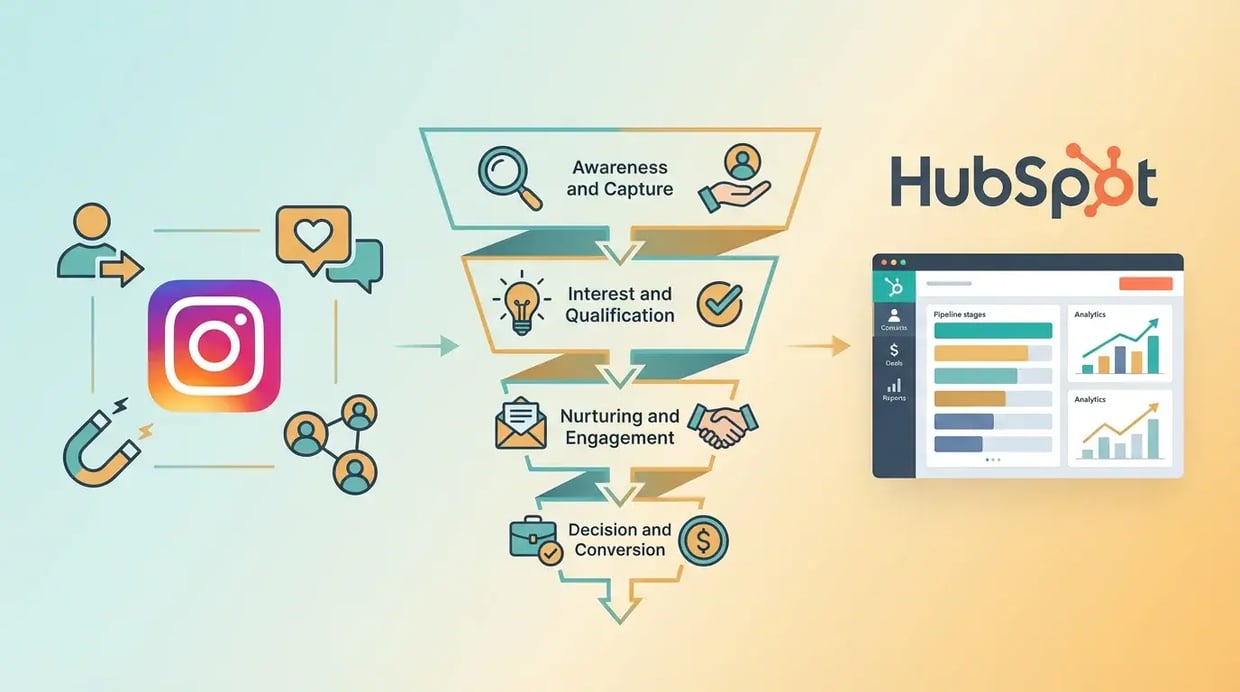
When you put it all together, you have a complete, measurable, and scalable sales funnel, all originating from Instagram.
| Funnel Stage |
Action |
Tool |
| Awareness |
User sees your content (post, story, reel) |
Instagram |
| Interest |
User DMs you a keyword or replies to a story |
Instagram |
| Capture |
Contact is automatically created in HubSpot |
HubBase |
| Nurture |
User receives a sequence of value-driven emails |
HubSpot Workflows |
| Conversion |
User replies to an email or books a meeting |
HubSpot Sales Hub |
| Sale |
Sales rep closes the deal |
HubSpot Sales Hub |
This isn’t just a marketing strategy; it’s a growth engine. It’s a system that turns casual social media engagement into predictable revenue.
Stop thinking in terms of “likes” and “followers.” Start thinking in terms of conversations and conversions. Build the bridge between Instagram and HubSpot, and you’ll unlock a lead generation channel you never knew you had.
Ready to build your Instagram lead machine? Get started with HubBase and start capturing and nurturing leads today.



















.png?width=343&height=334&name=Frame%20(3).png)
.png?width=343&height=479&name=Frame%20(4).png)
 3 min read



.png?width=204&height=62&name=Frame%20(13).png)
.png?width=204&height=62&name=Frame%20(18).png)
.png?width=204&height=62&name=Frame%20(11).png)
.png?width=204&height=62&name=Frame%20(12).png)
.png?width=204&height=62&name=Frame%20(15).png)
.png?width=204&height=62&name=Frame%20(16).png)
.png?width=204&height=62&name=Frame%20(17).png)
.png?width=194&height=62&name=Frame%20(20).png)
